
Showing posts with label Windows 8. Show all posts
Showing posts with label Windows 8. Show all posts
Thursday, September 18, 2014
Yes!!! No More Annual Subscription Fee for Windows Developer Account

Saturday, June 14, 2014
Tile Template
You can go to this link to find a complete list of tile template you can use for your Windows 8, Windows 8.1 and Windows Phone app.
How to Use Segoe UI symbol in XAML
You can go to this link to find the complete listing of the symbols that you can use.
Example
Example
<TextBlock Text="" FontFamily="Segoe UI Symbol" >
How to Extend Splash Screen
Are you developing a Windows 8 or Windows 8.1 app and need to extend the splash screen? You can go to this link to learn how to extend the splash screen.
Tuesday, May 13, 2014
Good News! Get Telerik's Windows 8 and Windows Phone Controls For Free For Limited Time
Telerik, a market-leading vendor of UI controls, end-to-end solutions for mobile app development, ALM tools across all major development platforms, is offering free Windows 8 and Windows Phone controls for free for the next 4 days to help celebrate TechEd 2014 and .NET developers.
Simply go to www.telerik.com/TechEd to claim your free license within the next 4 days.
Simply go to www.telerik.com/TechEd to claim your free license within the next 4 days.
Monday, October 21, 2013
Error: The {0} cannot continue testing since the specified Windows Store App was not found! (Resolved)

I began to search online for solution and found that it was because I was using Windows App Certification Kit (Version 2.2). So after I go to http://msdn.microsoft.com/en-us/windows/apps/bg127575.aspx to download the latest kit (Version 3.1) and it works now.
Wednesday, September 4, 2013
Release 3 For Singapore PSI Is Now Listed In The Windows 8 Store

Check out the new release of Singapore PSI in the Windows 8 store. This new release comes with a few new features:
- Windows 8 share contract
- Windows live tiles


http://apps.microsoft.com/windows/app/singapore-psi/8d93205e-202a-4eee-a1a7-a0f7c411895c
Wednesday, July 31, 2013
New Release of Singapore PSI

Description
Download Singapore PSI to get the latest PSI level in Singapore. PSI readings are updated daily and hourly. All PSI readings are retrieved from the National Environment Agency (NEA).
Features
- Daily and hourly updates of Singapore PSI level
- Support live tiles
- Simple and nice user interface
Supported processors
x86, x64, ARM
x86, x64, ARM
New Release of Girls' Generation Wiki

Check the new release of Girls' Generation Wiki app for Windows in the Windows Store... :D
Description
Girls' Generation is a South Korean girl group formed by S. M. Entertainment in 2007. The nine member group consists of Taeyeon, Jessica, Sunny, Tiffany, Hyoyeon, Yuri, Sooyoung, Yoona and Seohyun. Find out more about Girls' Generation and the members from our Girls Generation Wiki Windows 8 app.
Feature
- Simple and nice user interface
- Latest tweet from @GirlsGeneration
Saturday, June 29, 2013
Meet the Windows 8.1 Preview
 |
| Slide show on your lock screen |
Windows 8.1 has added many new features and ways to personalize your PC. It also comes with a single search that brings you results from your PC, your apps, and the web. Sounds good right!
You will also notice that the UI of the store has changed which makes it easier to discover and download new apps.
However, user have to take note as Windows 8.1 preview is not compatible to all PC. So please take a good look at this page, http://windows.microsoft.com/en-us/windows-8/preview-faq, before installing the update.
Saturday, May 25, 2013
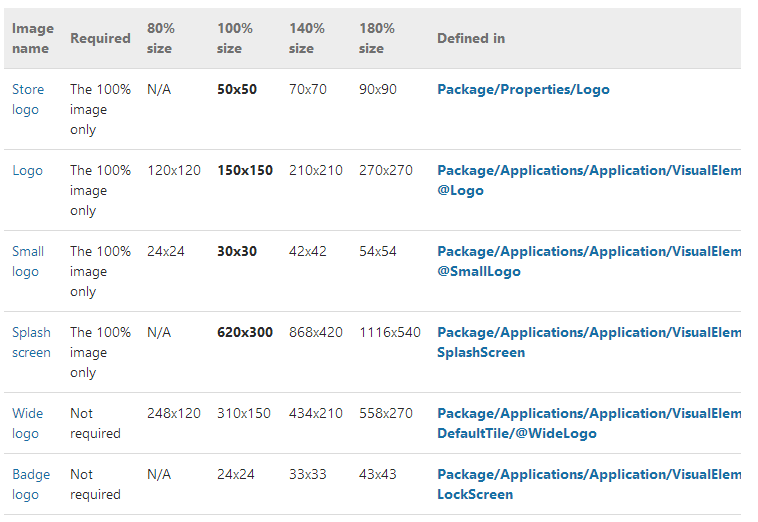
Windows 8 Development: Choosing your app images
This page describe the various logo sizes that you need to create for your Windows 8 application.

Click here to read more.
Credit: http://msdn.microsoft.com
Click here to read more.
Credit: http://msdn.microsoft.com
Subscribe to:
Posts
(
Atom
)